


Right underneath my nose something horrific has happened, my desk has slowly been taken over by hard drives. What once was a vast open space has quickly became a cluttered mess, consumed by box after box with noisy fans and an octopus of cords.This weekend I decided to do something about it now that I had a storage solution in place (see A Happy Ending to My Drive Crash) that was scalable and a tad more reliable.
Quite simply I removed 10 external drives from my desk. Yes 10! If you count my old 1.5 TB drive that was removed in January it would be 11. All 10 drives add up to 2.9 TB of space.
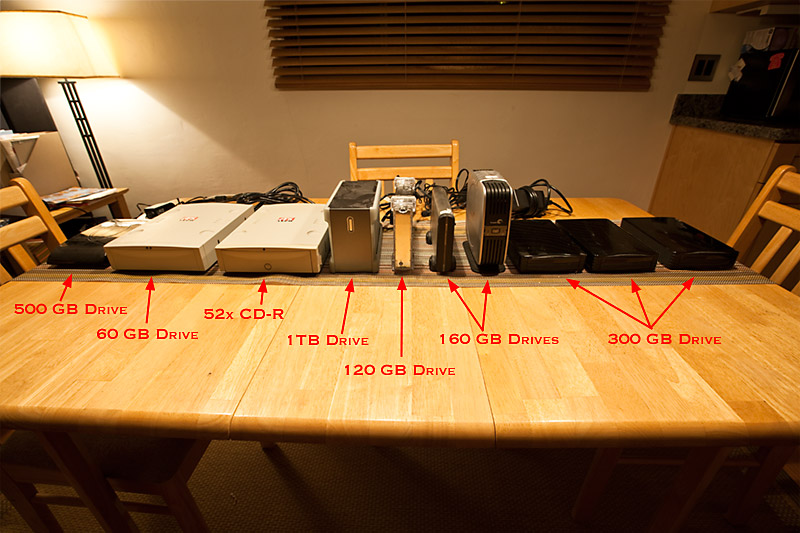
Drives Removed From My Desk
Now that my desk space has been reclaimed I have the space to work and I no longer live in fear of blowing a fuse (not that it ever happened). All of these drives have since been replaced with (1) one Firmtek enclosure housing (5) 1TB drives. Now as I need more space I can swap out drives from my enclosure, expanding storage space while maintaining the same drive footprint on my desk.
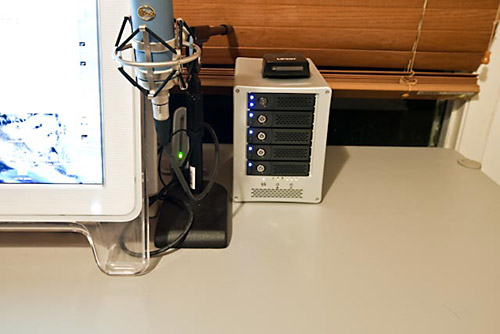
My FirmTek Drive and More Desk Space
While double checking that I had all my content backed up this weekend was time consuming, keeping me from other photo work, I’m elated that this is finally done. Of course the other great thing is that I’m no longer consuming so much electricity to access my data. One might say this was a “green” project.
If anyone local is looking for some drives let me know.
I wonder how long my clean desk will last?
Well it should stay this way, if not become less cluttered as I put in place my new Powermac and sell off my old dual G4 workstation and Quad G5 workstation. I can’t wait until this is all done.
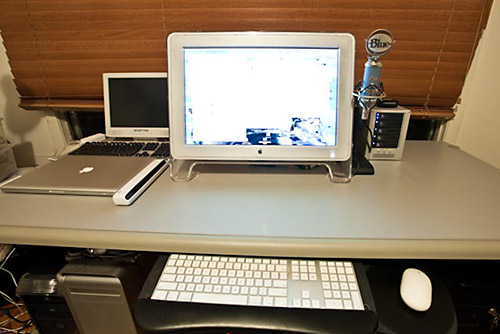
My Drive Free Desk
[tags]hard drive, clearance, desk, workspace[/tags]
hey, you are fooling your readers, tell the truth about your desk, when I saw it you neither could find the keyboard among all the stuff that was on it!!! This post was just an excuse for yourself to clean your desk! 🙂
Well, rationalizing the desk is always a good idea. But now you have to be aware thet you have put all your eggs in a single basket: also a simple faliure in the power supply of your FirmTek will result in having nothing of your archive available until fixed. Before, with many mode disk, the failure problem would have result in a partial data unavailable problem. So, much more than before, I think you must have a serious backup strategy to save data in case of problems (my suggestion is DVD stored outside your home). BTW, my best wishes for you very appreciate work with this blog.
Jim,
How much will you want for your Quad G5? I’m interested.
Edie Howe
Jim, your organization and clean desk is admirable – but I hope you know it is bad practice to keep a keg tap so close to electronics.
@luca LOL actually this has been a long needed clean-up. The focus of this was to highlight the difference getting rid of all these drives makes. I’m sure some papers will creep their way back on to my desk. I knew that messy desk would come back to haunt me on my blog!
–
@Massimo I have multiple backups including DVDs and back-up drives off-site. The Firmtek merely represents my working drives at home. Your point is well taken. One great thing about the Firmtek is that the drives can be pulled and placed into other enclosure or even my computer with ease (assuming you take them out of the tray).
–
@Edie I sent you an email earlier today. All reasonable offers will be considered. BTW I’m late in replying but the next time I’m swinging by Yosemite I’ll be sure to let you know.
–
@Mark LOL What’s funny is that this is the second time today someone has said that. Now the question is whether its bad practice because I’ll never get any work done or because of the risk of a spill.
Jim, I just had this funny image of coming back and taking a look at your desk in a couple years – and finding 10 FirmTek units there! The way that file sizes are trending and so forth… it could happen!
Dan
Jim – what a difference. I need to consider something like this, as I have five hard drives equaling 2.5TB’s under my desk. Is there a reason you chose that enclosure over something like a Drobo?
Noel
@G Dan Mitchell Sadly I can see this happening too. Hopefully not 😛
–
@Noel I have many of these points made in my linked post with in the content of this entry… but in short. Transfer speed was critical as was flexibility & up-time. I opted not to pursue a Drobo or a NAS solution because the files I’m creating are large and many. I’d have too much of a performance hit if I went this route. Ultimately the Firmtek atop it all also gives me a great deal of flexibility to infinitely add storage while not requiring that I add more enclosures.
Your desk is much cleaner from what I remember it last month Jim. Those cases are very good