


 |
In February 1990 Adobe released Photoshop 1.0. 20 years later the landscape of photography has forever been changed. “Changed” is too light of a term… Photoshop revolutionized how people manipulate pixels resulting in an edited image file. The cultural impact over the past several years has been quite pronounced as “photoshopped” or “‘shopped” is commonly used in every day language. In fact it’s fair to say that most people now are on some level subconsciously aware of Photoshop even if they have never used it as they determine if what they’re viewing is authentic.
Going back in the way way back time machine I was in college when Photoshop came out. It was the coolest thing I ever saw. I used to go to computer software stores (they actually had such stores back then) and I’d pine over the application. Of course this was also in the day when to have color on my Apple Macintosh II (the first color Mac) I had to upgrade from 1MB of RAM to 2MB. That extra 1MB of RAM cost me $500. Once I made that upgrade and got a hold of Adobe Photoshop my life forever changed. I could never foresee that digital photo editing could be done as easily as it is today. What amazing features were in Adobe Photoshop 1.0? See the demo below that was shown at last nights NAPP Photoshop 20th Anniversary Celebration:
Having used every version of Adobe Photoshop since its launch in 1990 I’ve been aware of every feature change. Even still over time its been easy to forget how it all pieced together. At the NAPP Photoshop 20th Anniversary Celebration last night Scott Kelby MC’d a series of demonstrations by Dave Cross, Matt Kloskowski, Julieanne Kost, Rafael “RC” Concepcion and Terry White highlighting the major enhancements of each version of Photoshop. It was a great reminder of how the application has evolved over time.
Still even with all the enhancements since the release of Photoshop 1.0 the core of Photoshop functionality is the same. Scott Kelby in 2-3 minutes summed it up at the opening of the Photoshop Celebration by quickly editing one of his photos… adjusting levels, converting it to B&W, cropping, expanding the canvas to create a border around the image, moving the image within the canvas, and adding text. Everyone of these types of edits can be done today. 20 years ago it was monumental to be able to do these things. The persistence of this functionality speaks to its core usefulness of Photoshop to photographers and designers alike. Everyday we make such edits and never think twice about it.
A quick side note, once I started working with Photoshop in college I knew I wanted to do something with it. I knew I’d be working with Photoshop before I knew I’d be pursuing photography. I never thought about that until now. Shortly after I learned the ropes with Photoshop I was shooting film and scanning photo prints to edit and share. Later I was scanning slides and later still editing digital files straight from my camera. The convergence of digital photography and digital editing solidified Photoshop’s place as the essential tool to have, but it also became an important thread in the fabric of our culture. Is there a day you don’t think about Photoshop these days?
2 Key Highlights
Beyond the walk down memory lane in demonstrating the evolution of Photoshop there were two key highlights to note from the NAPP Photoshop 20th Anniversary Celebration:
1. Kevin Connor, Senior Director of Product Management for Adobe conducted a live demonstration of “Content Aware Fill” also (called PatchMatch) functionality in the “White Rabbit” version of Photoshop (AKA Photoshop CS5). This functionality was demonstrated in removing a person who was standing against a wall. Rather than the background color showing through it auto filled with the texture of the wall. Another demo was conducted with an imprecise panoramic photo that had been stitched together. Empty areas were automatically filled in between and around the completed stitched photo. To give you an idea of what this functionality is like here is an earlier video of a demonstration:
2. Russell Brown put on one of the most creative and funny demonstrations I’ve ever seen. I really hope Adobe puts a video of it up on YouTube. As part of that demo he showed Adobe Photoshop 1.0 (the original application) running on an iPhone. 40 or so lucky individuals in the audience received commemorative USB thumbdrives that doubled as a ticket to receive a copy of the “Adobe Photoshop 1.0” iPhone application. The full application, in its classic UI, runs on the iPhone. It was incredibly cool to see in action. Russell was kind enough to give me a thumbdrive and a means to get this application during a pre-event interview. As soon as I have the application on my iPhone I’ll find a way to share a video of it in action. Unfortunately I didn’t get the vibe that this app would be released to the general public through the Apple App Store given the increasing tension between Apple and Adobe (see What Steve Jobs Said During His Wall Street Journal iPad Demo). With a little luck it’ll find its way out for others to use.
I was able to squeeze in a few short interviews at the event so stay tuned for those conversations as part of future episode of EXIF and Beyond.
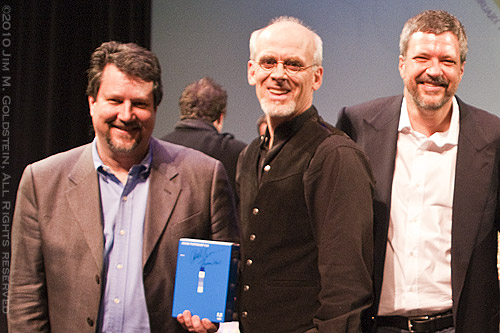
John Knoll, Russell Brown and Tom Knoll at the 20th Anniversary Celebration of Adobe Photoshop
Related Reading/Watching:
- Full Video of the NAPP/Adobe 20th Anniversary of Photoshop Presentations (Recommended)
- From Darkroom to Desktop—How Photoshop Came to Light
- Thomas & John Knoll
- Photoshop Start Up Memories (video) – Paul Caponigro
[tags]photography, technology, Adobe, Photoshop, technology, software, NAPP, Scott Kelby[/tags]
Pingback: Photoshop 1.0.7 iPhone App Review » JMG-Galleries – Jim M. Goldstein Photography
Pingback: Photo Mentor » Blog Archive » Link Roundup 02-28-2010
Pingback: EXIF and Beyond: Russell Brown, John Knoll & Kevin Connor » JMG-Galleries – Jim M. Goldstein Photography
Some of these tutorials
are extremely good, magazine like. Thanks for sharing!
Congratulation and best wishes for Adobe Photoshop.