
JMG Galleries, Photography by Jim M Goldstein

facebook
rss
stumble-upon
twitter
  • Home
  • Blog
  • Apps
  • Photo Tours
  • Contact + Use Permision

4 Quick Ways to Boost Lightroom 2 Performance

Date: 12 Aug 2008
By: Jim Goldstein
Tag: Lightroom 2
Comment: 7

Given some comments I’ve read with in my Lightroom 2 review “Adobe Lightroom 2.0 – First Impressions That Impress” and across the web I thought it would be a good idea to share some Lightroom 2 optimization tips I’ve recently found. Hopefully this information and the respective web sites this information was found on will prove to be helpful for those that have made the plunge with their Lightroom upgrade. With out further ado here are…

4 Ways to Boost Lightroom 2 Performance

1. Drive Space
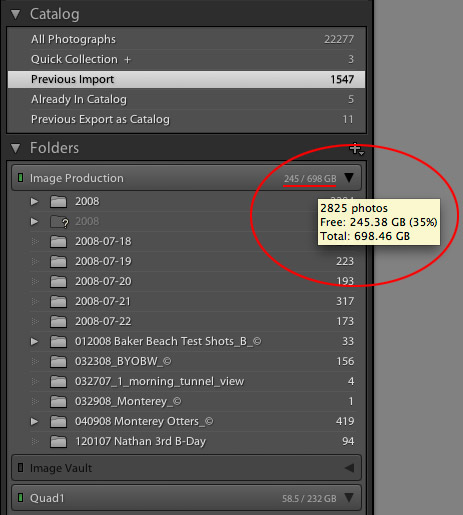
Lightroom 2 - Drive Space
Click To Enlarge

Have as much free space as possible on your start-up hard drive. If you don’t know how much free space you have check the Volume Browser.

Tip – The Volume Browser – Matt Kloskowski at Adobe Photoshop Killer Lightroom Tips

Although dated information and not Lightroom 2 specifi the core message is a good one…
Quickly clear space by deleting PSD files that you accumulate over time. Granted you’ll want to back them up first.  Friday Tip – PSDs and Drive Space – via Matt K. again at APKLT.

2. Catalog Optimization
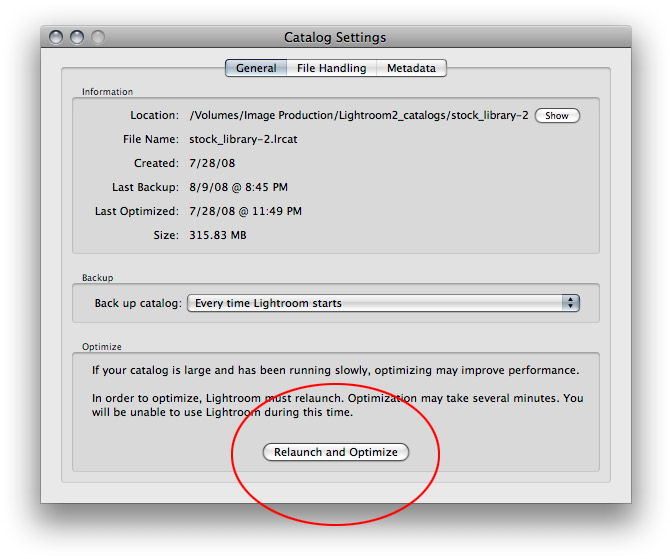
Lightroom 2 - Catalog Optimization
Click To Enlarge

Utilize the Catalog Optimization feature (after backing up your catalog) and adjust the Preview Cache to the appropriate resolution. If you don’t need Metadata suggestions deactivate it to help boost performance.
Note: Changing the preview size will not impact existing images in Lightroom. To apply these changes to existing preview images use Library -> Previews -> Discard 1:1 Previews menu item. This can take a while so it might be best to conduct this overnight depending on the size of your catalog. Also note that such optimization steps need to be applied to each individual catalog you may have.

Lightroom Tip#17: Speeding Up LR 2.0 Catalogs – Outdoor Images Fine Art

3. Camera Raw Cache

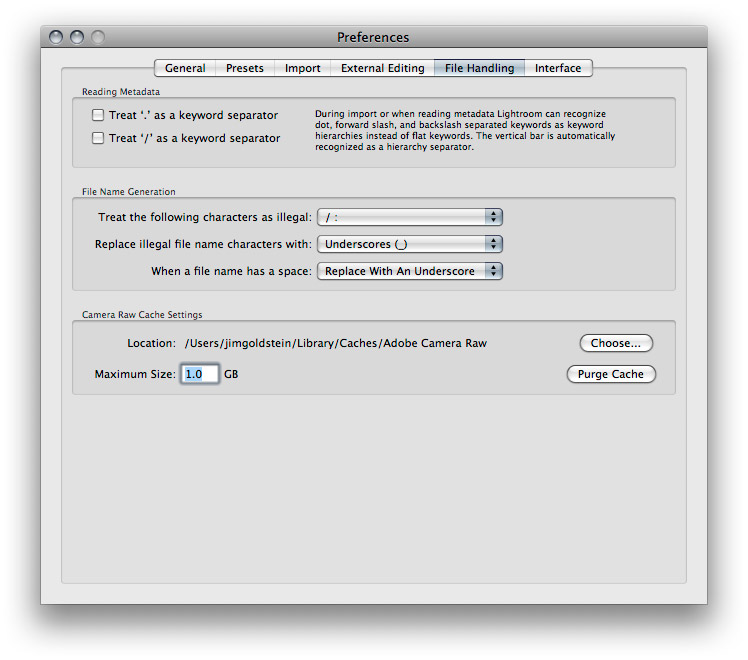
Lightroom 2 - Camera Raw Cache
Click To Enlarge

Every time you open an image in Camera Raw the full resolution of the image must be loaded into Camera Raw…as you can imagine, this can be pretty processor intensive…the Camera Raw cache will cache recently opened images to make re-opening them faster. There’s a preference limit to determine the size and the cache will remain constant in size by flushing out older cache files when newer images are loaded into Camera Raw.

In the Camera Raw preferences, you can choose how large a cache to allow, where it is stored and you can purge the cache from there. If you have a large amount of free disk space on your drive, I would actually suggest increasing the cache for improved performance. If space is tight (like on a laptop) you can reduce the cache preference.

I would not be inclined to flush the cache if you have a lot of drive space…in fact I would suggest increasing the cache amount–if performance is important to you…

- Jeff Schewe via Luminous Landscape Forum
4. Viewing in Develop mode vs Library Grid mode

For example, on one of my catalogs, I only ever look in Grid mode if I’m in the Library module, or I’m switching to Develop module (which reads the full res file anyway), so on that catalog I have the smallest lowest quality previews – I don’t need anything bigger.

On another catalog, I often view the images in Loupe mode on a 23″ high res screen, so those I have set to a large preview and a medium quality.

When you say you’re having to wait 10 seconds for a preview to show up, I’m guessing you’re in Develop module? The thing you need to understand about that is that it first shows the preview file, then does a quick read of the raw file, frees up the sliders, and then finishes reading the raw file properly. Your preview setting will only affect the very first view you see, and after that it’s down to disc read speed, whereas in Library module you are viewing the previews you’ve already created. Best thing you can do in Library module is to render previews before you start looking at the files, either in the Import dialog or by selecting all and using Library menu > Previews > Render Standard Previews.

- Victoria Bampton – Lightroomforums.net

2 Quick Productivity Tips:

1. Use Shortcuts

Use Keyboard Shortcuts Mac Version (PDF) and Windows version (PDF) via “The Lightroom Queen” Victoria Bampton

2. Regularly Back Up Your Catalog(s)
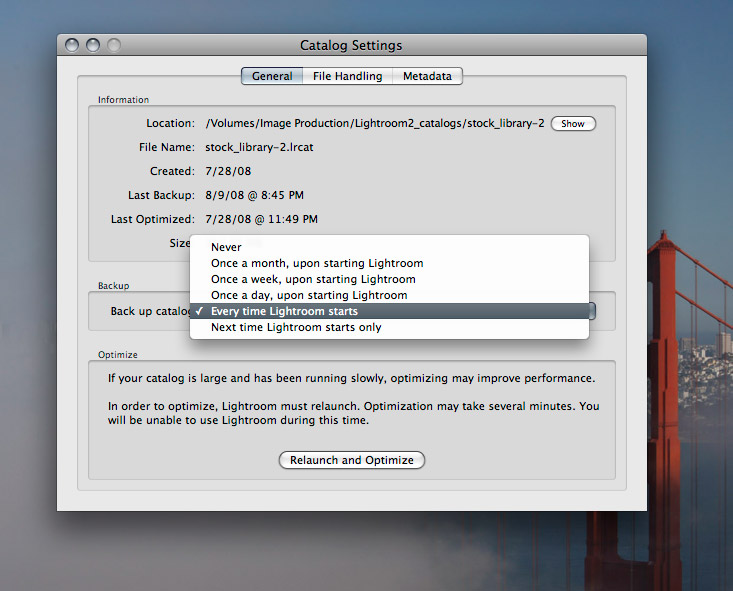
Lightroom 2 - Back Up Your Lightroom 2 Catalog
Click To Enlarge

Lightroom > Catalog Settings > General – Back Up Catalog

Once a copy has been made be sure to back it up to reliable media whether a second drive to keep off-site or to a DVD. Nothing can impact productivity more than losing your catalog.

.

Known Incompatibility Issues:

Nvidia 9600GT sluggishness with 3D Settings

3D Settings > Manage 3D Settings > Global Settings > Multi-display/mixed GPU Acceleration

By default it should be multiple display performance mode. Change this to a single display performance mode.

[tags]Adobe, Lightroom 2, performance, tips, optimization[/tags]


Related Posts with Thumbnails

  • Pingback: The weekly view: 16. August 2008 | Farbfoto

  • Pingback: Link Roundup 08-16-2008

  • Pingback: 4 metode de îmbunătăţire a performanÅ£ei în Lightroom 2 « Resurse Foto

  • Pingback: Bokeh.fr, site d’expression photographique » Actualités » Informations en vrac pour Lightroom

  • Pingback: PhotoNetCast #18 - Interview with Lightroom product manager Tom Hogarty | PhotoNetCast

  • Pingback: Photography Tutorial links | Yanik's Photo School

  • Pingback: Améliorer les performances de Lightroom | Paroles numériques

Connect With Me

 
Subscribe via eMail Subscribe via eMail 1.6 Million Followers Subscribe via Twitter 15770 Followers Subscribe via Facebook 12132 Fans

Newsletter

Subscribe to my mailing list to receive periodic updates, tips, inspiration, workshops and more.

Close

Advertisers

  • Blue Green Global Resorts
  • Rear View Camera

Recent Posts

  • Ultimate Time-Lapse Photography Giveaway Results
  • Dogwoods Blooming in Yosemite National Park
  • Last Day to Enter to Win the Ultimate Time-Lapse Photography Setup
  • My Favorite Photography Comic “What the Duck” is Back
  • Yosemite Sunrise (Revisited)

Categories

  • Links
  • Links & Articles
  • News & Current Events
  • Photography
    • Cityscape
    • Copyright
      • Creative Commons
      • PLUS
    • Daily Photo
    • Events
      • BYOBW
      • Fleetweek
      • Icer Air
      • Macworld
      • Mavericks
      • Rowell Award
      • World Photography Festival
    • Featured
    • Fine Art
    • Flickr
      • Explore
    • Friday Freebie
    • Landscape
    • Locations
      • Alaska
        • Arctic Refuge
      • Arizona
      • California
        • Big Sur
        • Death Valley
        • Los Angeles
        • Mendocino
        • Monterey
        • Muir Woods National Monument
        • San Francisco
        • Santa Barbara
        • Yosemite
      • Colorado
      • Costa Rica
      • Hawaii
        • Kauai
        • Maui
      • Illinois
        • Chicago
      • Minnesota
      • Montana
        • Glacier National Park
      • Nevada
      • New Mexico
        • White Sands National Monument
      • New York
      • Oregon
      • South Dakota
      • Switzerland
      • Utah
      • Washington
      • Wyoming
    • Macro
    • Nature
    • Panoramic
    • Philosophy
    • Photo A Day
    • Photoshelter
    • Podcast
      • EXIF and Beyond
      • PhotoNetCast
    • Quotes
    • Sports
    • Terminology
    • Tips & Tricks
    • Travel
    • Videos
    • Wildlife
    • Workshop
    • Zooomr
  • Poll
  • Reviews
  • Stock Photo
  • Technology
    • App
    • Camera
    • Hardware
    • iPad
    • iPhone
    • Social Media
    • Software
    • Web
  • Updates & Announcements
    • Featured

Tags

Abstract Adobe Alaska App Apple Arctic Refuge ASMP Blog Project California Contest Copyright EXIF and Beyond Fine Art Friday Freebie Giveaway Hawaii Interview iPad iPhone Landscape Lightroom Macro Mavericks National Park Nature Panoramic Philosophy Photography Photoshop Podcast Poll Review San Francisco Social Media Software Speedlink Stock Photo Stock Photos Switzerland Technology Tips & Tricks Travel Video Wildlife Yosemite

Blog Archive

  • 2013 (16)
    • May (1)
    • April (5)
    • March (4)
    • February (1)
    • January (5)
  • 2012 (59)
    • December (4)
    • November (3)
    • October (5)
    • September (2)
    • August (3)
    • July (2)
    • June (5)
    • May (6)
    • April (6)
    • March (7)
    • February (11)
    • January (5)
  • 2011 (130)
    • December (10)
    • November (8)
    • October (10)
    • September (8)
    • August (12)
    • July (14)
    • June (13)
    • May (11)
    • April (11)
    • March (14)
    • February (10)
    • January (9)
  • 2010 (151)
    • December (16)
    • November (13)
    • October (11)
    • September (5)
    • August (16)
    • July (10)
    • June (10)
    • May (9)
    • April (17)
    • March (14)
    • February (14)
    • January (16)
  • 2009 (198)
    • December (15)
    • November (15)
    • October (17)
    • September (18)
    • August (17)
    • July (25)
    • June (19)
    • May (16)
    • April (9)
    • March (15)
    • February (15)
    • January (17)
  • 2008 (222)
    • December (12)
    • November (15)
    • October (13)
    • September (18)
    • August (20)
    • July (16)
    • June (24)
    • May (21)
    • April (23)
    • March (21)
    • February (18)
    • January (21)
  • 2007 (334)
    • December (22)
    • November (26)
    • October (27)
    • September (20)
    • August (20)
    • July (26)
    • June (36)
    • May (41)
    • April (48)
    • March (28)
    • February (18)
    • January (22)
  • 2006 (52)
    • December (12)
    • November (16)
    • October (10)
    • September (14)

Links

  • Blue Green Global Resorts
  • Rear View Camera

QR Code to Go

qr code

Recent Comments

  • Mark Lobo on 10 Ways To Improve as a Photographer
  • Harjeet Singh on Why I Hate HDR: Photo Technology Porn
  • Shane on eMotimo TB3 Review
  • Ian Abdilla on Win the Ultimate Time-Lapse Photography Setup – Over $5000 in Prizes
  • Animesh Ray on Putting the Post in Post-Processing

My Sites

  • Flickr – Jim M. Goldstein
  • JMG Galleries Stock Photo & Video
  • JMG Photoshelter Archive
  • JMG-Galleries (Home)
  • Sportsshooter – Jim M. Goldstein
  • Stock Photography by Jim M. Goldstein

Photo Blogs

  • Ansel Adams Gallery
  • Antonio Marques
  • Art Wolfe Blog
  • Bild och foto
  • Brian Auer
  • Carl Donohue
  • Frank Winters
  • G. Dan Mitchell
  • Greg A. Lato
  • Janson Jones
  • Jay Goodrich
  • John W. Wall
  • Martin Gommel
  • Michael E. Gordon

Photographers

  • Adam Barker
  • Art Wolfe
  • Brenda Tharp
  • Bret Edge
  • Chase Jarvis
  • Cindy S. Reed
  • Clyde Butcher
  • Dan Baumbach
  • Darwin Wiggett
  • David Sanger
  • Enrique Aguirre
  • Floris van Breugel
  • Frederic Larson
  • Gary Crabbe
  • Guy Tal
  • Ian Plant
  • Jack Hollingsworth
  • James Kay
  • Jay Goodrich
  • Jerry Greer
  • Jerry Monkman
  • Joe McNally
  • John Greengo
  • John O'Conner
  • Jon Cornforth
  • Joseph Rossbach
  • Julieanne Kost
  • Kah Kit Yoong
  • Kevin Schafer
  • Landscape Photography Blogger
  • Lane Hartwell
  • Marc Adamus
  • Mark Graf
  • Michael D. Kern
  • Michael E. Gordon
  • Michael Frye
  • Patrick J. Endres
  • Paul Marcellini
  • Phil Colla
  • QT Luong
  • Rebecca Jackrel
  • Richard Wong
  • Robert Glenn Ketchum
  • Ron Niebrugge
  • Russ Bishop
  • Russell Graves
  • Seung Kye Lee
  • Sherri Meyer
  • Tim McGuire
  • Tim Parkin
  • Tom Lowe
  • Tony Kuyper
  • Tony Rath
  • Vincent Laforet
  • Will Burrard-Lucas
  • William Neill
  • Younes Bounhar

Copyright © JMG-Galleries – Jim M. Goldstein Photography, All Rights Reserved
  • Pin It
  • Buffer