


 |
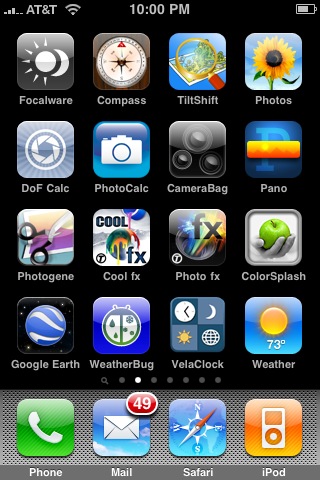
The advent of the app store has opened a large number of applications for niche markets and one of the most popular markets that developers have been targeting has been photography. The number of photography applications for the iPhone pales in comparison to the number of games that have been released, but what the numbers don’t reveal is the high percentage of quality apps versus junk available to photographers. Below are 11 photography related applications that I have on my iPhone and have been using even more following my upgrade to the iPhone 3G S.
Note: If you missed it see my Apple iPhone 3G S Camera Review.
PhotoCalc 
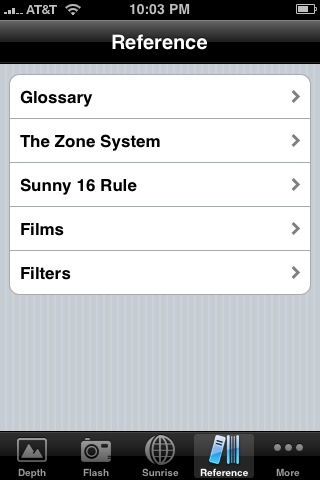 |
This is the Swiss Army knife of photography applications. It contains a Depth of Field calculator that allows you to determine Hyperfocal Distance, Near Limit, Far Limit, etc. based on Focal Length, Aperture and Subject distance values. There is also a Flash Exposure calculator taking into account Aperture, ISO, Flash Power, Subject Distance and Guide Number. A solar calculator that is based on your location will keep you informed to when Twilight Begins/Ends, Sunrise, Solar Noon, and Sunset happens. There is also data on Moonrise, Moonset and Moon Phase. If that weren’t enough there is a Reference area for Glossary terms, Zone System info, the Sunny 16 Rule, Films, Filters and an Exposure Reciprocation calculator.
Tiffen Cool fx
Tiffen has transitioned nicely to the world the iPhone. Their Cool fx filter application provides 36 color filters, 54 black & white filters, 63 Diffusion/Texture filters, 27 film grain filters and 18 color temperature filters. Filters can be saved as “virtual” layers and images are saved out as new files. This application provides a new lease on creativity with iPhone generated photographs.
Tiffen Photo fx
Tiffen’s other filter product while not as robust provides more stylistic filters including 6 Wild fx filters, 4 Classic fx filters, 6 Fun fx filters, 6 Outer fx filters and 4 Face fx filters. With the ability to save out photos with filters applied to them it’s easy to experiment mixing and matching effects from multiple applications.
Color Splash
Color Splash enables you to convert a photograph to Black & White while selecting an area to remain in color. The application enables you to save editing sessions and resume editing sessions that are incomplete. The controls (Pan/Zom, Color, Gray, Mask and Brush) take some getting use to and its not as precise as a more robust desktop application like Photoshop, but it does get the job done. As with the previous applications noted images are saved out leaving the original intact.
Photogene
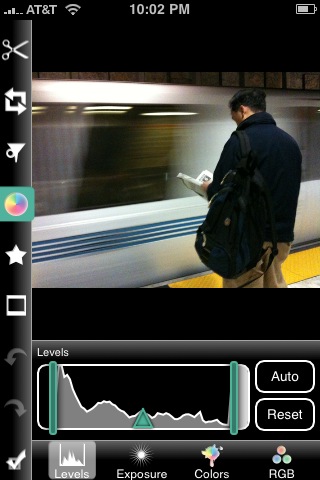 |
Is a handy application that allows you to adjust levels, exposure, colors and RGB settings for a photo taken on an iPhone. Cropping tools, Framing templates, Thought/Speech bubbles and Sharpening functions are also available. This application has been a gold mine in that it is able to clean up photos quite easily and effectively. This is usually the first application I run when preparing a photo taken on my iPhone and in my mind is the Adobe Photoshop of the iPhone.
TiltShift
A fun application that applies lens or gaussian blur adjustments to a photo to mimic a tilt-shift lens effect. The tilt-shift lens effect being the means to create an optical illusion that you’re looking at a toy like scene. The controls do require a bit more thought than one might hope for, but the end effect works well.
DoF Calculator
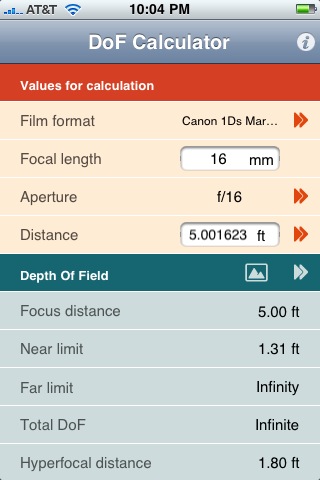 |
A straight forward Depth of Field Calculator that factors in “Film Format”. The “Film Format” value takes in to account magnification factors which is something that was missing from PhotoCalc. Calculations are to 7 decimal points and seems to be highly accurate. Other than “Film Format” calculations are based on Focal Length, Aperture and Distance. Results are provided for Focus Distance, Near Limit, Far Limit, Total DoF, Circle of Confusion and Hyperfocal Distance.
CameraBag
CameraBag lets you take a new photo or select an existing photo to give a Helga, Magazine, Mono, 1974, Infrared, Original, Lolo, Instant, 1962, Cinema or Fisheye look to. The application doesn’t provide much control over each image treatment, but as a pre-canned solution it works well. I use this application selectively usually at the end of my iPhone photo workflow.
Pano
A handy software solution to create Panoramic photos using your iPhone. The software allows you to take photos and align them for clean stitching. There are few to no controls in this application so its a mixed bag, it’s straight forward and simple yet no room for fine tuning.
Google Earth
While not specifically a photo application the iPhone version of Google Earth provides a mobile research tool that every photographer should have on hand. The ability examine locations before hand or in transit is great and on top of that you can see photos taken near locations of interest and access Wikipedia entries if any exist for your area of interest. All around one of the slickest applications I’ve seen for the iPhone.
FocalWare
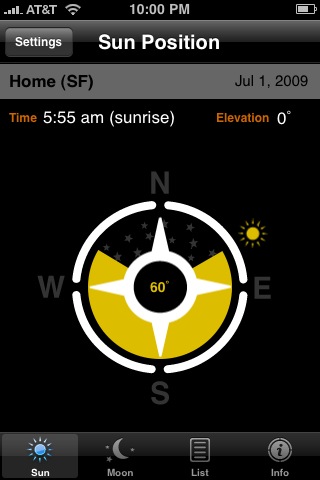 |
I’ve saved my favorite application for last. FocalWare provides data essential to photographers who photograph outdoor subjects. The application can work off your exact location (via GPS), locations you manually set or locations that exist in an included list of locations. Why is this application so valuable? Sun & Moon location, in relation to due North, is provided in degrees, elevation and time of day. This provides an exact means of researching and preparing to photograph a subject with specific lighting or placement of the sun/moon in the scene. The controls for this application are dirt simple and its also possible to see data for dates far in the future.
[tags]Photography, iPhone, App, App Store, Apple[/tags]
Pingback: SDuffyPhotography.blog » Blog Archive » Friday Link Love – 07/03/09
The FocalWare app is really useful if you are a landscape photographer, my favorite app 🙂
I was visiting the south of Norway and was looking for an interesting place to shoot the sunrise. I used FocalWare and Google Maps to calculate where the sun would rise in relation to the landscape and got this result: http://www.flickr.com/photos/mortenprom/3482556061/ 🙂
I think the bird I’d guide would be of great use for nature photogs
Pingback: IPhone Photo app’s « TomDingman Photography
These all sound like really good apps – all I need now is an iphone!!!
Good selection of picks Jim. Most I already have here, a few I will check out. There is a DOF calculator as a web app for free that does nearly the same stuff – iphone.dofmaster.com .
I am waiting for Lightroom for iPhone! 🙂
Pingback: Fotografía 101 | Notas sueltas [cosas que encontramos por la web]
Richard that would be a good one, but perhaps rather niche. I tried to choose applications that would be of help to a wider audience… at least this go round.
It’s a great app. Beautiful photo Morten!
LOL yes that would be a good start Mandy
Mark great tip. My only problem with web based DOF calculations is that if you’re in a dead zone or really far out you won’t get any value out of them. The only exception is if you take screen captures, but then you have to anticipate certain values that might limit you.
Oh and to your Lightroom comment Mark… I’m REALLY surprised that Adobe hasn’t released an iPhone app. It seems like a missed opportunity.
Great list. Helios is another one people might want to try. I found I like it better than Focalware.
Great set of iPhone apps Jim! I have each of these in my “iPhone Photo Bag” as well. One other app that should be included (indirectly) is The Weather Channel App. Especially for Landscape and Location photographers. This is hands down the best weather app for the iPhone.
While this app not only gives you the current and forecast weather for multiple locations (you build your own list), it also provides real time weather map data as well: radar, clouds, temperature. Very useful to plan ahead (I was just thinking of an evening photo hike but wanted fog, a quick glance on the map just saved me a trip as no fog tonight).
And if your in areas with severe weather potential, it can even alert you to that. That feature came in very useful for me up in Yosemite this spring!
Another favorite of my is 3D Camera. Definitely a different way to photograph the world. Thanks for the list!
Pingback: Photography Links – July 10, 2009 « Photo Notes: Photography by Patty Hankins and Bill Lawrence
Pingback: Saturday Links Fever [2009-07-11] | All Day I Dream About Photography
Molly thanks for the tip I’ll be sure to check that out.
Pingback: Some photo link-love goodness.. | Chuqui 3.0
I just bought photoforge, a must have for the iPhone
Pingback: 5 More Must Have Photography iPhone Applications » JMG-Galleries – Jim M. Goldstein Photography
An app I made that you might find interesting is called PhotoTangler ( http://www.solideightstudios.com/products/phototangler/iphone/ ), which offers a fun, unique solution for blending images together into collages.
Yes and Like to the post!
I grabbed 3 apps thanks to you!
Please consider adding LensTutorial, http://www.lenstutorial.com to your list. It is very different from the other DOF calcs because it is visual and interactive.
Are you interested in making your photographs masterpieces instantly with a few
taps? Do you want to make your shots awesome, no matter if they are old vintage
black and white or new high resolution colorful images, by applying a plethora
of special effects?. Do you want to use selective colors, variety of
brush sizes (either manual or automatic), gestures like Pan/Zoom/Splash,
unlimited undos, Colorize, Tintalize, Recolor, blend brush to create custom
effects and text blending in the image? Don’t you want to support both
landscape or portrait mode and options like loading/import photo from Cloud,
instead of just from the camera or photo library? Being an experienced
photographer, are you tired of image editors having several critical limitations?
Won’t it be cool if you had a choice of 130+ built-in effects on different
parts of the same image with numerous attempts and still having the option of
creating your own custom effects ? Would you like to have option to make
favorite list of built-in effects to choose them easily for future? You can
also share your masterpiece with your friends through Email, Instagram,
Facebook, Twitter, Flickr, Picassa, even export to iPhoto and photoshop or post
it in form of card to anywhere in the world.
If you are looking for an app with all of above
features, try out PhotoSplash Fx.
Being an experienced
photographer are you looking for some impressive Iphone/Ipad app to make your
photographs masterpieces instantly with a few taps? Try PhotoSplash Fx that has following unique features that
you can’t find in any other app altogether.
· Make your shots awesome, no matter if they are
old vintage black and white or new high resolution colorful images, by applying
a plethora of special effects
· Use selective colors, variety of brush sizes
(either manual or automatic), gestures like Pan/Zoom/Splash, unlimited undos,
Colorize, Tintalize, Recolor, blend brush to create custom effects and text
blending in the image
· It supports both landscape or portrait mode
and options like loading/import photo from Cloud, instead of just from the
camera or photo library
· Choice of 130+ built-in effects on different
parts of the same image with numerous attempts and still having the option of
creating your own custom effects
· Option to make favorite list of built-in
effects to choose them easily for future
· Share your masterpiece with your friends
through Email, Instagram, Facebook, Twitter, Flickr, Picassa, even export to
iPhoto and photoshop or post it in form of card to anywhere in the
world.
https://itunes.apple.com/us/app/photo-splash-fx-editor-multiple/id482487175?mt=8
http://www.mastermindspower.com/app/photo-splash-fx-ipad
http://www.mastermindspower.com/app/photo-splash-fx-for-iphoneipod
http://www.mastermindspower.com/app/photo-splash-fx-windows-phone
http://tozaitech.com/app_detail.php?pid=3